PHP Vulnerability (PHP2Shell): Hackers Are Breaking Into Websites Through Old PHP Versions. Is Yours Next?
Picture this. Your website looks great, your plugins are updated, your password is strong. And still, a stranger can take control of your server without logging in, without guessing anything, and without leaving a clear trace.
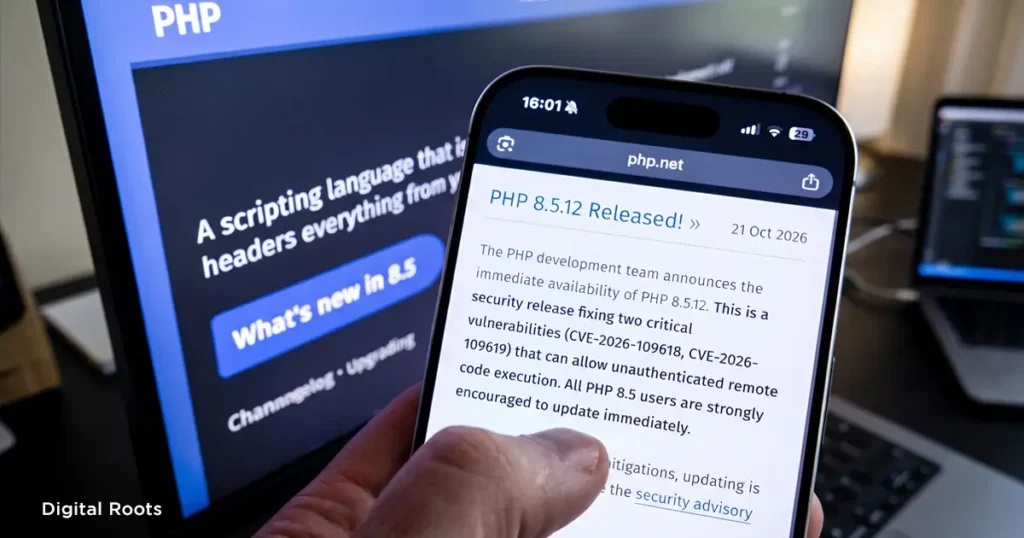
That is not a movie plot. It is what the newly found PHP vulnerability, nicknamed PHP2Shell, makes possible on servers that have not been updated. If you have been seeing “php vulnerability”, “php issue today” and “php news” all over Google this week, this is the reason, and for businesses running on old PHP versions it is a very big problem.
What is the PHP2Shell vulnerability? Your strong password will not save you
First, a quick answer to “what is PHP?”. PHP is the programming language that runs behind most websites, including WordPress. The PHP shell vulnerability, known as PHP2Shell, is a set of PHP security vulnerabilities that puts those websites at risk.
Two critical flaws, tracked as the PHP2Shell CVE pair CVE-2026-109618 and CVE-2026-109619, were found in PHP itself. Both are rated 9.2 out of 10, and both can let an attacker run code on your server with nothing more than a crafted web request. No login needed.
What makes it scarier for business owners:
- It does not depend on your CMS, theme or plugins. The weakness sits in PHP, so a fully updated WordPress site on an unpatched server is still exposed.
- Any page that PHP serves can be a way in, even a simple contact form or a login page.
- According to CrowdStrike’s analysis, it can leave almost no visible signs. Your site keeps loading normally, so “my website looks fine” is not proof that it is safe.
Latest PHP vulnerability news: hackers did not wait for the patch
PHP released the fixes on 21 October 2026, a day earlier than planned because the details leaked. Security teams say the attacks started even sooner. Amazon’s threat team reported a suspicious attempt as early as 17 October, days before anything was public, and many more attempts appeared within hours of the fix release.
The different attack styles seen suggest several attackers are involved. Security researchers also warn that the gap between a patch being published and attackers using it is getting shorter every year, so waiting a week to “see what happens” is a bad plan.
Government agencies across the world have issued warnings too, including CERT-In in India.
Why this is a business problem, not just an IT problem
PHP runs a huge share of the internet, estimated at close to 70% of websites by Cloudflare, including WordPress and WooCommerce stores. So the question is not whether PHP matters to you. It is whether the PHP on your server is up to date.
Here is what a hacked website can cost a business:
- Spam pages and hidden links that destroy the Google rankings you worked hard to build.
- Google warning visitors that your site is unsafe, so customers leave before seeing your offer.
- Ad money wasted, because people click your ad and land on a broken or blacklisted website.
- Customer data exposed, and trust lost in a single day.
- Days or weeks of downtime while the site is cleaned and restored.
We often say digital marketing is about getting the most out of what you spend. A hacked website does the opposite. It makes every rupee you spent on ads, SEO and content worth less.
The old PHP problem: no fix is coming for many websites
This is the part that hurts old websites most. The latest PHP version with the fix is PHP 8.5.12, and the other fixed versions are 8.4.27, 8.3.36 and 8.2.35. What about everything else?
- PHP 8.1, 8.0 and 7.4: no official update from the PHP team. Only your hosting provider, a long-term-support vendor or a manual backport can protect you.
- PHP 7.3 and older, including PHP 5: no fix at all. The only answer is moving to a supported version.
And there are a lot of such sites. One internet scan by Modat counted about 4.4 million PHP services exposed online before the release, and roughly 79% of them were on a version PHP no longer supports. Many business websites in Kerala were built years ago and never had their PHP version touched since. Those are the sites at the highest risk right now.
What to do in the next 24 hours
- Check your PHP version. In WordPress, go to Tools > Site Health > Info > Server. In cPanel, look for “MultiPHP Manager” or “Select PHP Version”. If you are not sure, ask your developer.
- Contact your hosting provider today. Ask whether the 21 October PHP fixes are applied on your server and which version your site runs on. Several large hosts have already started rolling out patched versions.
- Take a full backup first. Files and database, before any change.
- Upgrade to a supported, patched PHP version. Move to 8.2, 8.3, 8.4 or 8.5 with the latest fix, ideally on a staging copy first, because very old themes and plugins can break on newer PHP.
- Check for signs of a break-in. If your site stayed unpatched after 21 October, look for unknown admin users, unfamiliar files, strange redirects and sudden traffic drops, and ask your host or developer for a malware scan.
- Do not rely on a firewall alone. A web firewall can reduce the risk, but PHP itself says no setting fully protects you. Updating is the real fix.
Do not want to handle this alone? At Digital Roots, the best digital marketing agency in Thrissur, we treat your website as the foundation of all your marketing. Our team can check your PHP version, talk to your host and secure the site for you.
What if my website is too old to upgrade?
This happens a lot. A custom site from ten years ago, an abandoned theme, plugins that no longer exist. If your site cannot run on a supported PHP version, patching around it is only a temporary bandage. That is usually the moment to rebuild or modernise the website with a secure, fast and updated foundation, instead of paying again and again to keep an outdated one alive.
A website is not a “build once and forget” asset. Like a shop, it needs regular maintenance, and an update costs far less than recovering from a hack.
-Spend five minutes today checking your PHP version. It could save your business a lot more than that-
Not sure which PHP version your website is running on, or whether it is safe? Get a free website check from Digital Roots — the best digital marketing agency in Thrissur, Kerala.
www.digitalrootss.com | +91 70126 33305 | connect@digitalrootss.com